Frontend Development: Design Systems, Rendering and Performance
How we build interfaces that stay fast and consistent: design tokens and component libraries, rendering chosen per route, performance budgets in CI and tested accessibility.
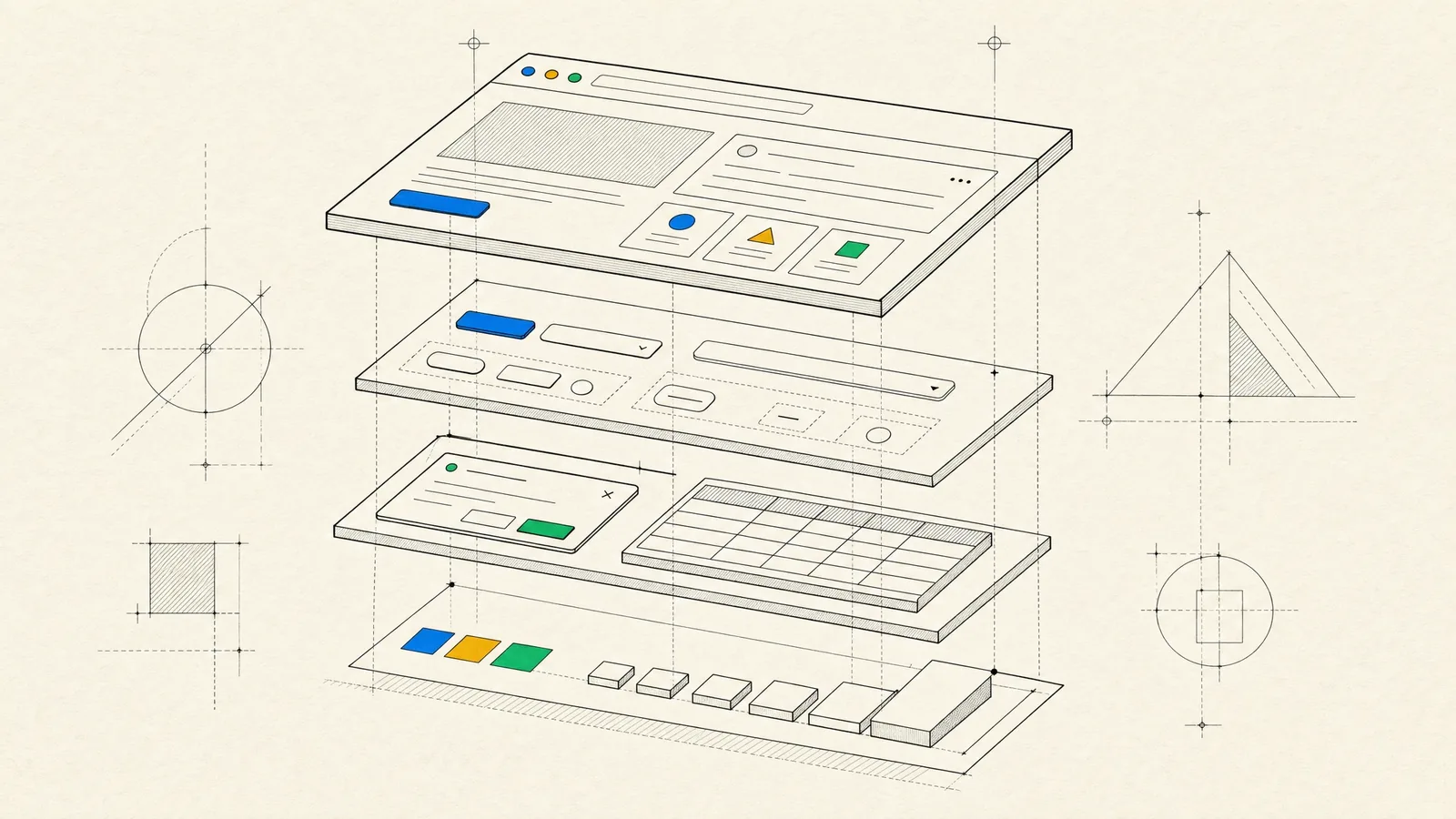
You want an interface that feels fast and predictable and matches the design right down to the empty states. It should work with a keyboard and a screen reader, and it should still be easy to change after the hundredth feature. Frontend development is where product decisions turn into something people can touch. It’s also where small shortcuts pile up into slow, inconsistent screens.
Good frontend work is fairly easy to recognize. There’s a shared component library instead of copied markup, and a rendering strategy chosen route by route rather than by trend. Performance budgets fail the build when they’re exceeded, and accessibility gets tested like any other requirement.
What we build on the frontend
- Interfaces for SaaS products, customer portals and internal tools. These are often data-dense, with large tables, filters, charts and complex forms. Our overview of web application development shows how the whole product comes together.
- Design systems and component libraries shared across several products or teams.
- Fast marketing and content sites, where page weight has a direct effect on search visibility and conversion.
- Rebuilds of legacy frontends, like jQuery or AngularJS code nobody wants to touch, replaced one screen at a time while the product stays live.
- Performance and accessibility rescues for existing applications.
TypeScript is our default. We work mainly with React, often through Next.js, and with Angular. Which one fits depends on your team and product, and the FAQ at the end touches on how we decide.
Design systems and component architecture
A design system starts with tokens. These are named values for color, spacing, typography, radius, elevation and motion, shared between the design files and the code, so a change to the brand color or the spacing scale happens in one place. Our UI/UX design team and our engineers maintain the tokens together. That closes most of the gap between the design file and the screen that ships.
We build components in layers:
- Primitives such as buttons, inputs and checkboxes, with every state defined: hover, focus, disabled, loading and error.
- Composites such as date pickers, comboboxes, data tables and dialogs. These usually sit on accessible headless libraries (Radix or React Aria in React, the Angular CDK in Angular), so we don’t reinvent keyboard and focus behavior.
- Feature components that know your domain, organized by feature rather than by file type.
The library is documented in Storybook and covered by visual regression tests, so a change to a shared component can’t quietly break a dozen screens. Server data lives in a caching layer, for example TanStack Query in React or signal-based services in Angular. Local state stays local, and a global store holds only the state that really is global.
If several apps use the library, we publish it as a versioned package with a changelog. Each team then upgrades deliberately, instead of discovering changes in production.
A caveat, though: for a single small app, a full design system is overhead. In that case we start with tokens and the handful of components you need, and extract more as patterns repeat.
Choosing a rendering strategy: SSR, SSG or SPA
The way HTML reaches the browser affects speed, SEO, hosting cost and complexity. Modern frameworks let you choose per route, and most products end up needing a mix.
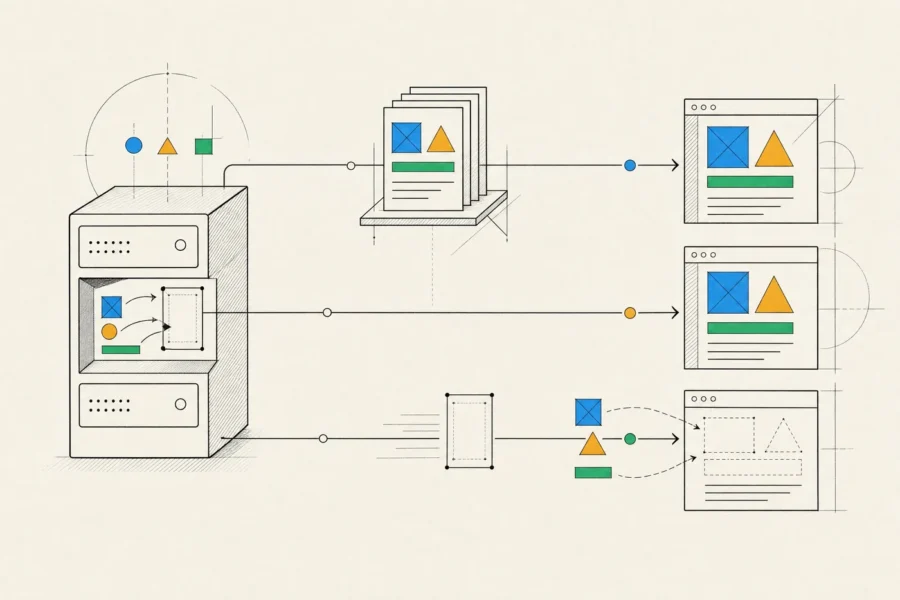
| Strategy | Best for | Costs and caveats |
|---|---|---|
| Static generation (SSG) | Marketing pages, documentation, blogs | Content changes need a rebuild or incremental regeneration; not suited to per-user content |
| Server-side rendering (SSR) | Public pages with fresh or personalized data, such as listings and search results | Needs servers and a caching strategy; the page still pays to hydrate in the browser |
| Single-page app (SPA) | Logged-in dashboards and tools where search indexing doesn’t matter | Slower first load and bigger bundles; focus and scroll handling on route changes need deliberate work |
| Hybrid and islands | Mostly static pages with a few interactive parts | Framework-specific models, such as React Server Components or Astro islands, add concepts your team has to learn |
A common and sensible split puts a static marketing site in front and an SPA or SSR app behind the login. What we avoid is shipping a large JavaScript bundle just to render pages that are mostly text.
With SSR, caching decides the economics. Pages that look the same for every visitor can be cached at the CDN for seconds or minutes, which takes away most of the server load, and personalized fragments load separately.
Performance budgets we actually enforce
A budget only works if something fails when you go over it. We set per-route limits on JavaScript and total page weight, along with targets for the Core Web Vitals at the 75th percentile of real visits. Google counts a page as good when its Largest Contentful Paint is 2.5 seconds or less, its Interaction to Next Paint is 200 milliseconds or less, and its Cumulative Layout Shift is 0.1 or less.

We enforce the budgets in three places:
- In CI, bundle size checks and Lighthouse runs on the main pages, under a throttled mobile profile, catch a heavy dependency in review rather than after release.
- In the code, we split by route, lazy-load charts, editors and maps, virtualize long lists and tables, serve responsive images, and reserve space for anything that loads late.
- In production, real-user monitoring tracks those same metrics by page and device type, since lab scores on a developer laptop flatter everyone.
Most slow frontends are slow for dull reasons: too much JavaScript, unoptimized images, blocking third-party scripts, chatty API calls. We profile first and fix those before anyone reaches for clever memoization.
Accessibility as an engineering practice
We target WCAG AA and make it part of the definition of done, rather than an audit at the end. In practice that means:
- Semantic HTML first. A real button beats a clickable div with ARIA bolted on, and incorrect ARIA is worse than none.
- Full keyboard support for custom widgets, following the established patterns for menus, tabs, comboboxes and dialogs. That includes trapping focus inside a dialog and returning it when the dialog closes.
- Managed focus on route changes in single-page apps, plus live regions so screen reader users hear about toasts, validation errors and newly loaded results.
- Contrast checked at the token level, and animation that respects reduced-motion preferences.
Lint rules catch the obvious mistakes while code is being written, and automated axe checks run in the component and E2E tests. Automated tools only find part of what real users run into, though, so our QA testers also walk through the main flows with a keyboard and with screen readers such as VoiceOver and NVDA.
How our frontend development engagements work
Frontend work rarely happens in isolation. We work from your designs or ours, against your API or one we build (our backend development guide covers that side).
Before building, we check the designs for missing states: loading, empty, error, long content, small screens. We also agree on an API contract, usually OpenAPI with generated TypeScript types. Mocked endpoints then let the interface move ahead while the backend is still in progress.
Tokens and components come first, then screens. Unit and component tests cover logic and component behavior, Playwright E2E tests cover the critical journeys, and QA testers check each iteration across browsers and devices. Releases go out behind feature flags, and real-user metrics guide what we improve next.
Throughout, you get demos on a staging environment and regular written reports. At the end you receive the application, a documented component library, automated tests, and a performance and accessibility report, with the budgets wired into CI.
Sometimes the frontend isn’t the real problem. When pages are slow because of the API, or users get stuck because the product flow is confusing, a frontend project alone won’t fix it. In that case we’ll show you where the time is actually going.
Frequently asked questions
React or Angular?
Both are solid. React has more third-party libraries and gives you more freedom in how you structure an app. Angular gives large teams a consistent, batteries-included structure. Often your team’s existing skills decide it. Our Angular development guide explains when Angular is the better fit.
Will a single-page app hurt our SEO?
It can. Google renders JavaScript, but in a separate, later step, and many other crawlers and link-preview bots don’t run JavaScript at all. Pages that need to rank should be server-rendered or static.
Do we need a design system?
Yes, if you have more than one product, several frontend developers, or a brand that has to stay consistent across many screens. For a single small app, tokens and a core set of components are enough to start with.
Should we split our frontend into micro frontends?
Only if separate teams really need to deploy parts of one interface independently. Otherwise the costs (duplicated dependencies, inconsistent UX, harder integration testing) outweigh the benefits, and a well-structured monorepo solves the same problem more cheaply.
Can you speed up our existing frontend?
Usually, yes. We start from field data to find the pages and interactions that actually hurt users, fix the biggest causes first, then add budgets to CI so the gains don’t erode.
We look at field data before proposing changes to an interface, so the best way to start is to send us a link to your product and the screens that bother you most.