.NET Development: APIs, Blazor and Cloud Apps on Modern .NET
Modern .NET for APIs, web apps and cloud services: where it shines, where Blazor fits and where it does not, and how we build fast, observable C# systems.

Teams usually come to us for .NET development with a clear goal: an API or web platform that’s fast, strongly typed, easy to operate and built to last. Often there’s a constraint as well, like an existing C# team, a Microsoft-centered organization, or a .NET Framework system that the new platform will eventually have to replace.
A well-built .NET service starts quickly and uses resources efficiently, deploys the same way every time, and reports what it’s doing through logs, metrics and traces. Modern .NET, the open-source, cross-platform successor to the .NET Framework, does all of that well if you use it deliberately.
What we build with .NET
- High-throughput APIs for mobile apps, partner integrations and single-page front ends
- Line-of-business platforms with complex rules, such as finance, legal, healthcare and logistics workflows
- Background processing: imports, reconciliation, notifications, scheduled jobs and message consumers
- Real-time features with SignalR, like live dashboards and in-app notifications
- Internal tools and admin portals, sometimes in Blazor
- Replacements for .NET Framework systems (our ASP.NET development article walks through that path step by step)
How we approach .NET development
Discovery starts with the shape of the load and the integrations: who calls the system and how often, which operations must be strictly consistent, and which can be eventually consistent. Our business analysts write those rules down as acceptance criteria before any code exists, because in line-of-business software the rules are most of the product.
Then comes design. Our default is a modular monolith, meaning one deployable application with clearly separated modules and explicit contracts between them. We only split out separate services for a concrete reason, such as independent scaling, a separate team or a different release cadence. A modular monolith is cheaper to run and easier to debug, and if the boundaries were drawn well, it can still be split later.
During the build, the compiler takes on part of QA’s job. Nullable reference types are enabled, warnings fail the build, and analyzers run in CI. Our QA testers own the regression suite that runs through whole user flows. Releases go through automated pipelines with health checks, and we keep a close eye on traces and error rates after each one.
Stack and architecture choices
APIs
ASP.NET Core gives you two styles. Controllers suit large APIs with shared conventions and filters, while minimal APIs are lighter and now cover most needs. We pick one per project and stick with it. A lot of what used to need a library is now built in, including OpenAPI document generation, rate limiting, output caching, health checks and standard problem-details error responses.
Data
Entity Framework Core is our default, and keeping it fast is mostly a matter of habits: no-tracking queries for reads, projections instead of whole entities, split queries where joins multiply rows, and set-based bulk updates and deletes. Hot paths with complex SQL get Dapper alongside it. SQL Server and PostgreSQL are both first-class options, and which one fits depends on your hosting, your licensing and your team.
Identity and security
When you manage users yourself, accounts go through ASP.NET Core Identity. For staff and business customers, we use an OpenID Connect provider such as Microsoft Entra ID. Secrets live in a vault, never in configuration files in the repository. Data protection keys are persisted and shared across instances, so sign-in cookies and anti-forgery tokens keep working after restarts and when the app scales out.
Background work and dependencies
Simple background loops run as hosted services. Durable scheduled jobs go to a proven scheduler like Hangfire or Quartz.NET, and services talk to each other through a message broker with retries and dead-letter queues. We also check the license of every dependency. Some popular .NET libraries, MediatR and AutoMapper among them, now require a commercial license for many business uses, and that cost belongs in the budget conversation.
Cloud and hosting
Because modern .NET runs on Linux and in containers, you have a real choice of hosting: Azure App Service or Container Apps, AWS, Kubernetes, or plain virtual machines. If you’re on Azure, Microsoft Entra ID, Key Vault and managed identities fit together especially well. Native ahead-of-time compilation can cut startup time and memory for small services and functions. It also rules out reflection-heavy libraries and some framework features, MVC controllers included, so we only use it where cold starts matter.
Blazor: where it fits and where it does not
Blazor lets you build interactive web UI in C#. A page can be rendered statically on the server, made interactive on the server over a persistent SignalR connection, or run in the browser on WebAssembly. It can also start on the server and switch to WebAssembly on later visits. None of these modes is free:
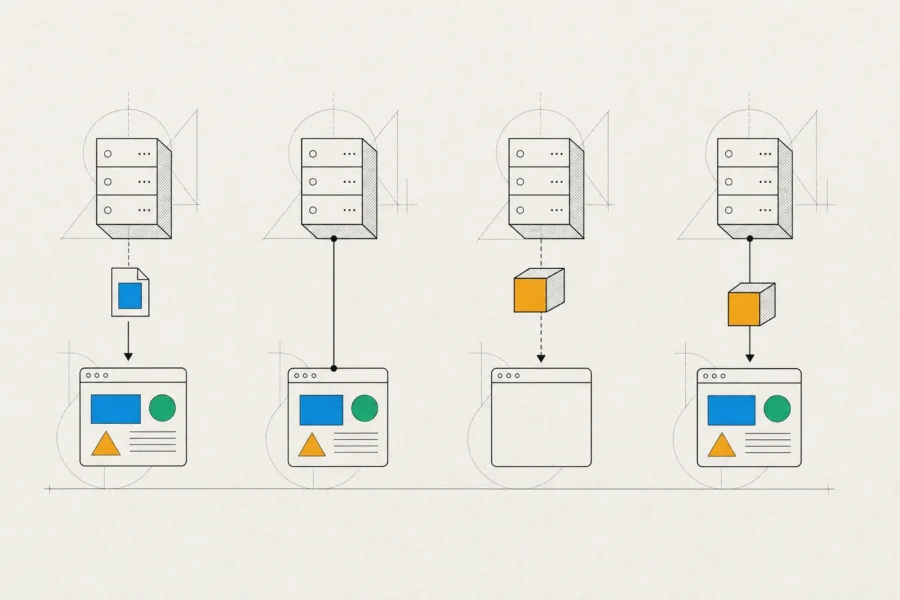
- Interactive server mode keeps state on the server for every connected user and needs a stable connection. On a good network it feels instant, and on a poor mobile one it’s fragile.
- WebAssembly downloads the .NET runtime and your code before the page becomes interactive, which is a noticeable first-load cost for public sites.
- The pool of third-party components and experienced developers is smaller than what React or Angular have.
Where we land: Blazor is an excellent choice for internal tools, admin panels and line-of-business apps built by a C# team, because one language across the stack pays off there. For public, mobile-heavy or SEO-critical products, we usually pair a .NET API with a JavaScript front end instead. Our frontend development article covers that approach.
Performance and quality
.NET is fast by default, and that makes it easy to waste. The problems we fix most often have nothing to do with the runtime. They’re blocking calls inside async code that starve the thread pool, chatty database access, missing caching and large allocations on every request. We measure before changing anything: OpenTelemetry traces in production, dotnet-counters and dotnet-trace for live diagnostics, and BenchmarkDotNet for the rare hot path that deserves micro-optimization.

Tests come in layers. Unit tests cover domain rules. Integration tests run the real HTTP pipeline in memory against a real database, started in a container with Testcontainers, so what passes in CI behaves the same way in production. Playwright tests walk through the critical user journeys in a real browser, and for any interface we ship, accessibility checks for semantic markup, keyboard navigation and screen readers are part of the definition of done. Security reviews focus on per-resource authorization, secrets management and vulnerable packages, which the .NET tooling flags during restore.
When .NET is the right platform, and when it is not
.NET is a strong choice when you need high throughput on modest hardware, when the system is long-lived and full of business rules, when you have a C# team or hiring market, or when you rely on Microsoft identity, SQL Server, Azure and Office tooling. Microsoft ships a new release every November and every other release gets long-term support, so upgrades follow a predictable rhythm.
It’s less compelling in a few situations. A team that writes TypeScript everywhere can keep one language across front end and back end with Node.js. Data science and machine learning work belongs in Python, even when a .NET service is the one calling it. A marketing site or content platform is faster to deliver on a CMS. And for consumer mobile apps we usually recommend native or React Native over .NET MAUI, which fits best when a .NET team is building internal apps.
How an engagement works
A new platform gets a dedicated product team: a business analyst, a product designer if the system has user-facing UI, .NET engineers and a QA tester. Work is planned in iterations that each end with a demo. Modernization work starts differently, with a focused assessment and a phased plan. In both cases the code lives in your repository from the first commit, and you also get infrastructure defined as code, runbooks for operating the system, and regular written reports on progress, risks and decisions.
Frequently asked questions
Is .NET only for Windows and Azure?
No. Modern .NET is open source and runs on Linux, macOS and Windows, in containers and on any major cloud. The Azure integration is excellent, but you don’t need it.
Should we use minimal APIs or controllers?
Either works for most projects. We lean toward controllers for large APIs with many shared conventions and toward minimal APIs for smaller, focused services. Within one codebase, we pick a style and stay consistent.
Is Blazor ready for production?
Yes, and it suits internal and line-of-business apps built by C# teams. For a public-facing product, weigh its first-load and connection trade-offs against a JavaScript front end first.
How often do we need to upgrade .NET?
Plan to move from one long-term support release to the next. The support windows overlap, so you have time to upgrade calmly, and staying current keeps each upgrade small.
Can you work with our in-house .NET team?
Yes. We can take full ownership of a module, pair with your developers, or handle a focused piece like performance work or a migration, with shared code review and conventions.
We’re happy to talk before you’ve settled on .NET. Write to us about the expected load, the integrations and your team, and we’ll suggest where to start, whichever platform that points to.